Introduction
You may occasionally come across services that needs access to your AWS infrastructure, or an EC2 machine.
One example of this is allowing Bitbucket build machines to SSH into EC2 within AWS.
A quick guide
create a file called bitbucket_whitelist.txt
For convenience, here's the full list:
https://support.atlassian.com/bitbucket-cloud/docs/what-are-the-bitbucket-cloud-ip-addresses-i-should-use-to-configure-my-corporate-firewall/
This will give you one IP address / line.
- create an .sh file with the following:
#!/bin/bash

SECURITY_GROUP_ID=sg-123456789 # This is your existing security group ID

while read -r CIDR
do
    aws ec2 authorize-security-group-ingress --group-id $SECURITY_GROUP_ID --protocol tcp --port 22 --cidr $CIDR
done < bitbucket_whitelist.txt
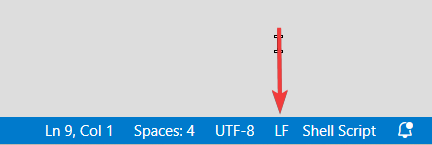
Make sure you save this with linux line endings. In visual studio you can find this option on the bottom right corner:
3. Add yourself permission in IAM:
{
    "Version": "2012-10-17",
    "Statement": [
        {
            "Effect": "Allow",
            "Action": "ec2:AuthorizeSecurityGroupIngress",
            "Resource": "arn:aws:ec2:region:accountnumber:security-group/sg-123456789"
        }
    ]
}
Done.
Once you run this, it should one-by-one add the CIDR ranges to the inbound allow list of your given security group.
About the author
I am a dedicated double certified AWS Engineer with 10 years of experience, deeply immersed in cloud technologies. My expertise lies in a broad array of AWS services, including EC2, ECS, RDS, and CloudFormation. I am adept at safeguarding cloud environments, facilitating migrations to Docker and ECS, and improving CI/CD workflows with Git and Bitbucket.
While my primary focus is on AWS and cloud system administration, I also have a history in software engineering, particularly in Javascript-based (Node.js, React) and SQL.
In my free time I like to employ no-code/low code tools to create AI driven automations on my self hosted home lab.
Comments
Join the discussionNo comments yet. Be the first to comment.